Start from a template
35 voices to start from: narrators, storytellers, teachers, presenters, characters and more. Then change any detail: age, accent, pace, manner.
Stentor turns your scripts into voiceovers in your voice, with AI that runs on your computer. No credits, no subscription, and nothing uploaded.
One payment · No subscription · No account · Works offline
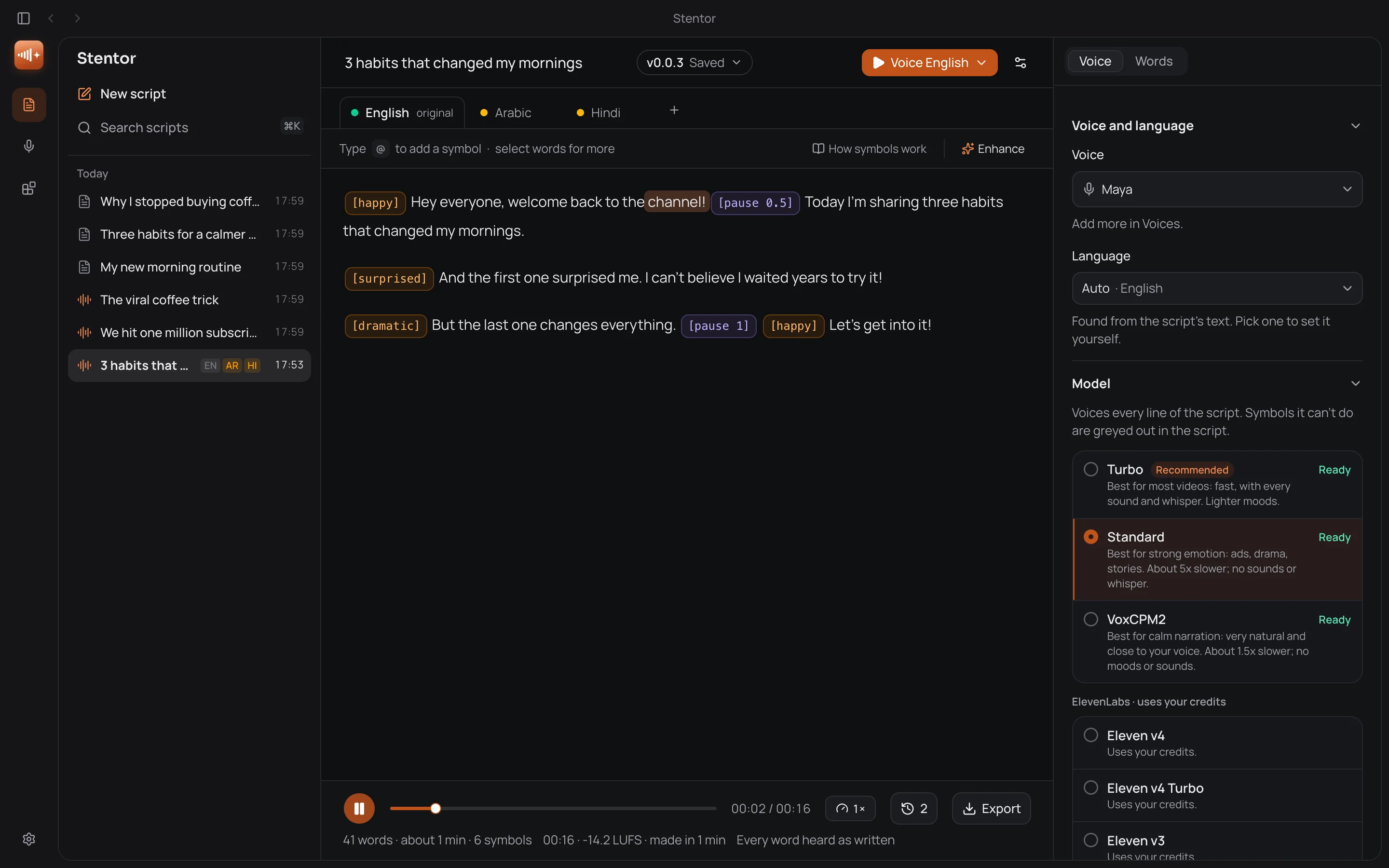
Moods, sounds and pauses go right in the script, in any of its languages, or set one tone for the whole script. Pick a sample, read the script, press play.
[calm] The sun was setting over the mountains, and everything was quiet. [pause 0.5]
Then we heard something, just behind the tent.
We had no idea what it was.
Put a mood before a line and it is read that way: calm for a quiet story, happy for good news, surprised for a twist.
[calm] The sun was setting over the mountains, and everything was quiet. [pause 0.5]
[gasp] Then we heard something, just behind the tent.
We had no idea what it was.
Sounds go where you type them, in the flow of the words, and a pause is exactly as long as you set it.
[happy] Welcome back! Today: three settings that feel brand new.
[happy] वापस स्वागत है! आज: तीन सेटिंग्स जो बिल्कुल नई लगती हैं।
[happy] أهلًا بعودتكم! اليوم: ثلاثة إعدادات تجعل جهازك يبدو جديدًا.
Each language is a tab of the same script: English, Hindi and Arabic side by side, each voiced, each with its moods.
[calm] كانت الشمس تغرب فوق الجبال، وكان كل شيء هادئًا. [pause 0.5]
ثم سمعنا شيئًا خلف الخيمة مباشرة.
لم نكن نعرف ما هو.
[calm] पहाड़ों के ऊपर सूरज ढल रहा था, और सब कुछ शांत था। [pause 0.5]
फिर हमें टेंट के ठीक पीछे कुछ सुनाई दिया।
हमें नहीं पता था कि वह क्या था।
[calm] 太阳正从山后落下,四周一片寂静。 [pause 0.5]
接着,我们听到帐篷后面有动静。
我们不知道那是什么。
[calm] 해가 산 너머로 지고 있었고, 모든 것이 고요했어요. [pause 0.5]
그때 텐트 바로 뒤에서 무슨 소리가 들렸어요.
그게 뭔지 전혀 몰랐어요.
[calm] El sol se ponía sobre las montañas y todo estaba en silencio. [pause 0.5]
Entonces oímos algo, justo detrás de la tienda.
No teníamos ni idea de qué era.
[calm] Le soleil se couchait sur les montagnes, et tout était calme. [pause 0.5]
Puis nous avons entendu quelque chose, juste derrière la tente.
Nous ne savions pas ce que c’était.
[calm] Die Sonne ging über den Bergen unter, und alles war still. [pause 0.5]
Dann hörten wir etwas, direkt hinter dem Zelt.
Wir hatten keine Ahnung, was es war.
[calm] മലകൾക്ക് മുകളിൽ സൂര്യൻ അസ്തമിക്കുകയായിരുന്നു, എല്ലാം ശാന്തമായിരുന്നു. [pause 0.5]
അപ്പോൾ ടെന്റിന് തൊട്ടുപിന്നിൽ എന്തോ ശബ്ദം കേട്ടു.
അത് എന്താണെന്ന് ഞങ്ങൾക്ക് അറിയില്ലായിരുന്നു.
[calm] மலைகளுக்கு மேல் சூரியன் மறைந்துகொண்டிருந்தது, எல்லாம் அமைதியாக இருந்தது. [pause 0.5]
அப்போது கூடாரத்துக்குப் பின்னால் ஏதோ சத்தம் கேட்டது.
அது என்னவென்று எங்களுக்குத் தெரியவில்லை.
Write or translate your script into Arabic, Hindi, Chinese, Korean and more. Right-to-left scripts read right to left, and the symbols work the same way.
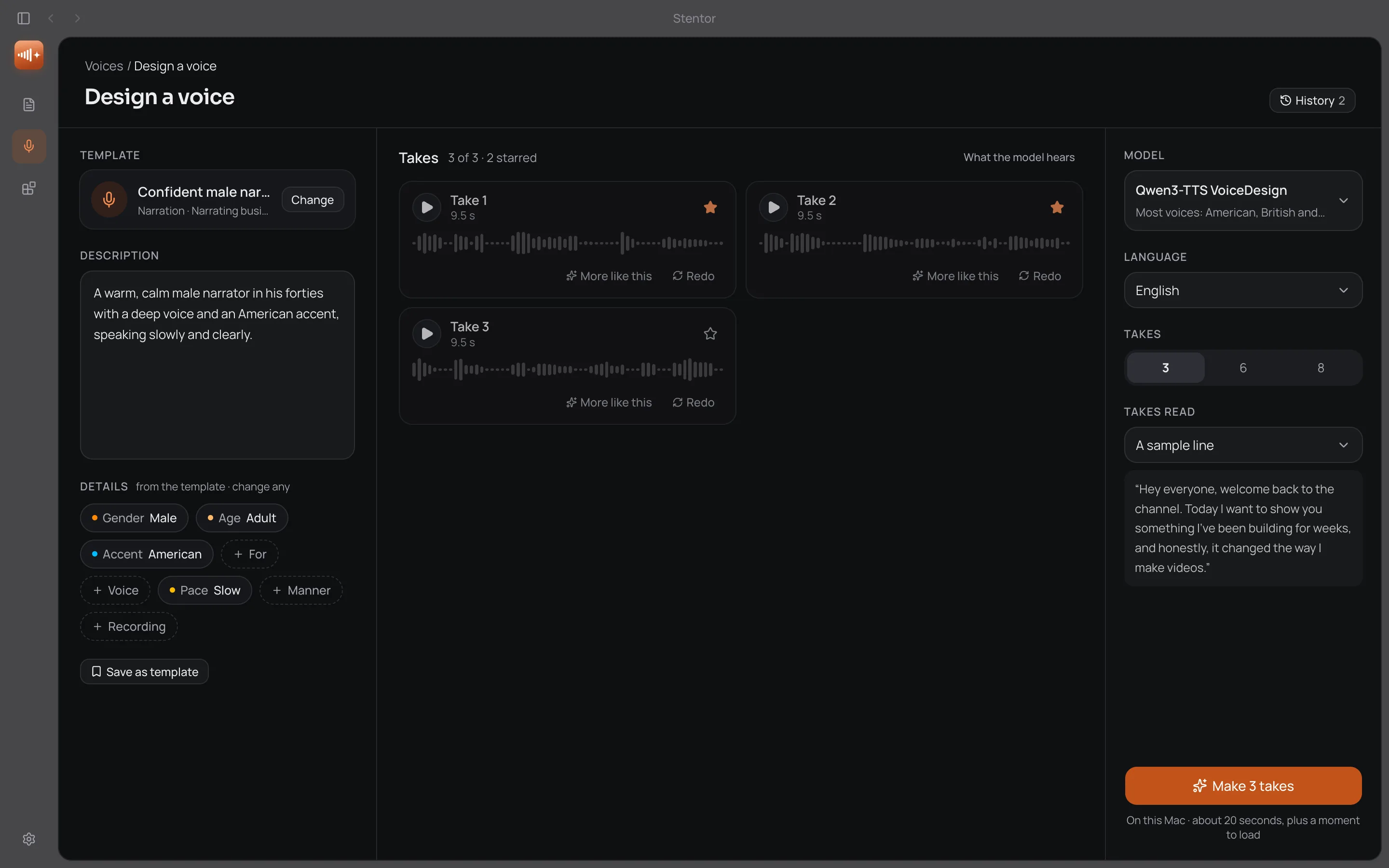
Need a voice you don't have? Describe it, or start from one of 35 templates, and Stentor makes takes on your computer. Keep the one you like and use it in every script. It's a made-up voice, so there's nothing to record.
35 voices to start from: narrators, storytellers, teachers, presenters, characters and more. Then change any detail: age, accent, pace, manner.
Make 3, 6 or 8 takes at once. Star the ones you like, redo one, or ask for more like a take: the same person, read a little differently.
A kept voice works in every script. Its page shows how it was made, and Design more like this brings it all back to try again.
Qwen3 for most voices, VoxCPM2 for the clearest studio sound and Hindi and Arabic, Maya2 for native Indian voices. All on your computer.
Every run is kept in History, so you can go back to a take later. Claude Code and Codex can design a voice for you too.
Start with a built-in voice or your own. Add the models you need, and connect the tools you already pay for.
Write, mark, voice, fix and translate, all in one editor. Shown in the real app.
Write it once, mark how it should sound, and voice as much as you need, on your own computer.
Voice every video in your own voice, without recording every take. Fix a line in seconds, not a whole session.
A steady narrator for every upload: one of 40 built-in voices, a voice you design, or your own.
Change one sentence and only that part is voiced again, so updating a lesson takes seconds.
Moods and sounds in the flow of the words: a laugh, a sigh, a dramatic beat where you want it.
Upbeat, punchy reads for spots of any length, with as many takes as you like and no credits.
One script in every language, as tabs, ready for YouTube’s multi-language audio.
Connect Stentor to Claude Code or Codex once. While you make a video with them, ask for the voiceover: Stentor voices it on your computer, in your voice.
Your AI app writes the script, or takes yours, and hands it to Stentor, moods and pauses included.
Stentor asks you which voice, model and mood to use, and asks before any download or any ElevenLabs credits. It never picks for you.
The voiceover, captions timed to your voice and word timings land in your export folder, so your AI app can put them in the video.
Still wondering about something? Write to [email protected].
$29, once. Every feature and every update, for one computer, with no subscription and no credits. Buy it, then download Stentor and paste your licence key when it opens. Not right for you? Ask for a refund in the first 7 days, right in Stentor.
Yes. Once the voice models are downloaded, writing, voicing, the word check and export all work with no internet connection. Only ElevenLabs, the Claude Code and Codex writing assistants, app updates and a quick licence check now and then need one.
No. Your recordings, your voice and your scripts stay on your computer, and voicing happens on its own chip. Nothing leaves it unless you choose to use ElevenLabs or a cloud writing assistant.
Right now, computers with Apple silicon (M1 or newer), and more systems are on the way. More memory makes voicing faster, especially for long scripts.
Yes. In the Voice Designer, describe the voice you want, or start from a template, and keep the take you like. It's a made-up voice: it belongs to no real person, and it can't copy one.
Only with their consent. To make a voice, the person reads a short consent line with a code shown on screen, and Stentor checks it was said before the voice is saved.
Built-in voices cover 16 languages, including Arabic, Hindi, Chinese, Korean, Spanish, French and German. Your own voice can speak more than 20 with the Multilingual model, and ElevenLabs adds its own languages.
Yes. Your voiceovers are yours to publish. The open models Stentor runs come with licences that allow commercial use, and each one is listed in the app under Integrations. For ElevenLabs voices, their own plan terms apply.
No Stentor account, ever. A few optional models ask for a free Hugging Face account, and ElevenLabs needs your own key if you use it.
One payment of $29. Every feature, yours to keep.
Buy Stentor · $29